How to Build a Guess-the-Number Game in Node.js
34 min read·Sep 27, 2025·Download source code
Welcome back to Code in Action, the series where we build practical backend projects step by step.
In this tutorial, we're going to recreate a simple yet classic command-line interface game: Guess-the-Number.
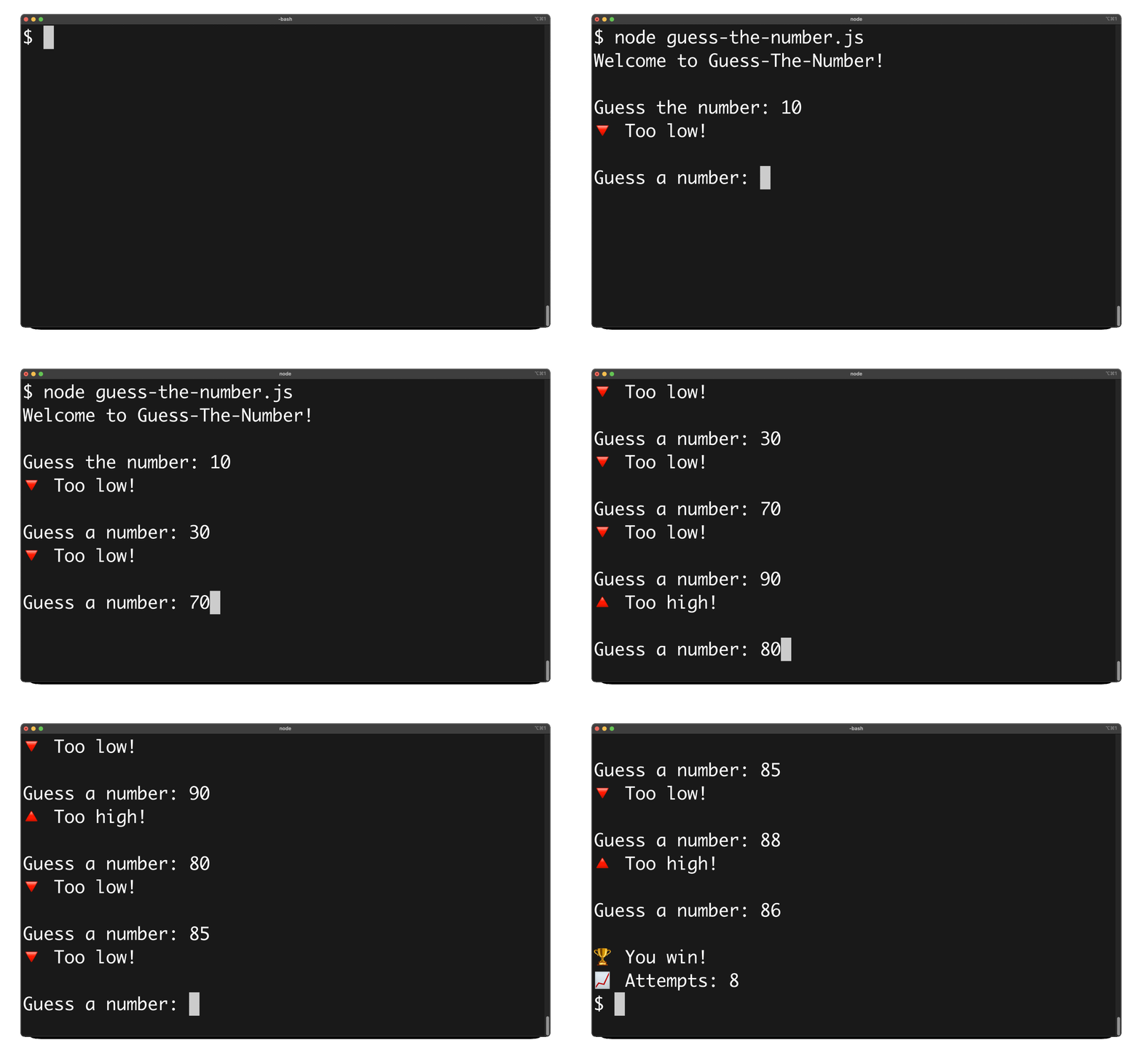
When launched, our game will:
- Asks the user to guess a random number between 1 and 100.
- Tells the user if their guess is too high or too low.
- Outputs the number of attempts it took to guess correctly.
By the end of this tutorial, you'll know how to:
- Keep the code readable and maintainable with small functions.
- Generate correct, inclusive random integers using the Math library.
- Read, parse, and validate user input from the terminal.
- Drive a simple game loop with event-driven callbacks.
- Use clean control flow to compare guesses and output hints.
- Track state with variables and render friendly messages.
- Exit gracefully when the player wins.
Ready? Let's build!
Step 1: Create the Script
Let's start by creating a new file named guess_the_number.js and opening it in your code editor:
$ touch guess_the_number.js
Step 2: Generate a Random Number
Inside this file, let's create a helper function called generateRandomNumber() that returns a random integer between 1 and 100:
function generateRandomNumber() {
  const MIN = 1;
  const MAX = 100;

  return Math.floor(Math.random() * (MAX - MIN + 1)) + MIN;
}
Step 3: Set Up the Game
Now, let's define a runGame() function that will generate the secret number, track the number of attempts made by the player, and print a “Welcome” message:
function runGame() {
  const number = generateRandomNumber();
  let attempts = 0;

  process.stdout.write('Welcome to Guess-the-Number!\n');
  process.stdout.write('\nGuess a number: ');
}
Step 4: Capture User Input
Let's set up an event listener that will fire every time the standard input stream receives a 'data' event:
function runGame() {
  const number = generateRandomNumber();
  let attempts = 0;

  process.stdout.write('Welcome to Guess-the-Number!\n');
  process.stdout.write('\nGuess a number: ');

  process.stdin.on('data', function (input) {
    //
  });
}
Then, let's convert the user input into an integer and increment the attempts counter:
function runGame() {
  // ...
  process.stdin.on('data', function (input) {
    input = parseInt(input.toString().trim());
    attempts++;
  });
}
Step 5: Handle Errors and Winning Condition
Let's add a first condition that checks if the input is invalid and outputs an error message:
function runGame() {
  // ...
  process.stdin.on('data', function (input) {
    input = parseInt(input.toString().trim());
    attempts++;

    if (isNaN(input)) {
      process.stdout.write('\nError: Please enter a valid number\n');
    }
  });
}
Let's add a second condition that checks if the input equals the secret number, output a “game over” message, and immediately terminate the script's execution:
function runGame() {
  // ...
  process.stdin.on('data', function (input) {
    input = parseInt(input.toString().trim());
    attempts++;

    if (isNaN(input)) {
      process.stdout.write('\nError: Please enter a valid number\n');
    }
    else if (input === number) {
      process.stdout.write(`\n🏆 You win!\n📈 Attempts: ${attempts}\n`);
      process.exit(0);
    }
  });
}
Step 6: Handle Wrong Guesses
Let's add two more conditions that check if the input is higher or lower than the secret number, and output an indicative message accordingly:
function runGame() {
  // ...
  process.stdin.on('data', function (input) {
    input = parseInt(input.toString().trim());
    attempts++;

    if (isNaN(input)) {
      process.stdout.write('\nError: Please enter a valid number\n');
    }
    else if (input === number) {
      process.stdout.write(`\n🏆 You win!\n📈 Attempts: ${attempts}\n`);
      process.exit(0);
    }
    else if (input > number) {
      process.stdout.write('🔺 Too high!\n');
    }
    else {
      process.stdout.write('🔻 Too low!\n');
    }
  });
}
Step 7: Wrap Up the Script
Let's output a new prompt at the end of the callback to invite the user to enter a new number and execute the runGame() function at the end of the script:
function runGame() {
  // ...
  process.stdin.on('data', function (input) {
    // ...
    process.stdout.write('\nGuess a number: ');
  });
}

runGame();
Step 8: Put It Together
Here's the complete script for this project:
function generateRandomNumber() {
  const MIN = 1;
  const MAX = 100;

  return Math.floor(Math.random() * (MAX - MIN + 1)) + MIN;
}

function runGame() {
  const number = generateRandomNumber();
  let attempts = 0;

  process.stdout.write('Welcome to Guess-The-Number!\n');
  process.stdout.write('\nGuess the number: ');

  process.stdin.on('data', function(input) {
    input = parseInt(input.toString().trim());
    attempts++;

    if (isNaN(input)) {
      process.stdout.write('\nError: Please enter a valid number\n');
    }
    else if (input === number) {
      process.stdout.write(`\n🏆 You win!\n📈 Attempts: ${attempts}\n`);
      process.exit(0);
    }
    else if (input > number) {
      process.stdout.write('🔺 Too high!\n');
    }
    else {
      process.stdout.write('🔻 Too low!\n');
    }

    process.stdout.write('\nGuess a number: ');
  });
}

runGame();
Step 9: Run the Game
Open a new terminal window and run your script with node:
$ node guess_the_number.js
Welcome to Guess-The-Number!

Guess the number: 10
🔺 Too high!

Guess a number: 1
🔻 Too low!

Guess a number: 5
🔻 Too low!

Guess a number: 7
🔻 Too low!

Guess a number: 9

🏆 You win!
📈 Attempts: 5
You'll be prompted to start guessing. Keep trying until you hit the right number!
Conclusion
Congratulations! 🎉
You've built a complete CLI game in Node.js!
Along the way, you practiced:
- Generating random numbers
- Reading and validating user input
- Using conditionals to branch logic
- Tracking attempts with variables