How to Write a Dependency-Free Env Loader in Node.js
26 min read·Jan 23, 2026
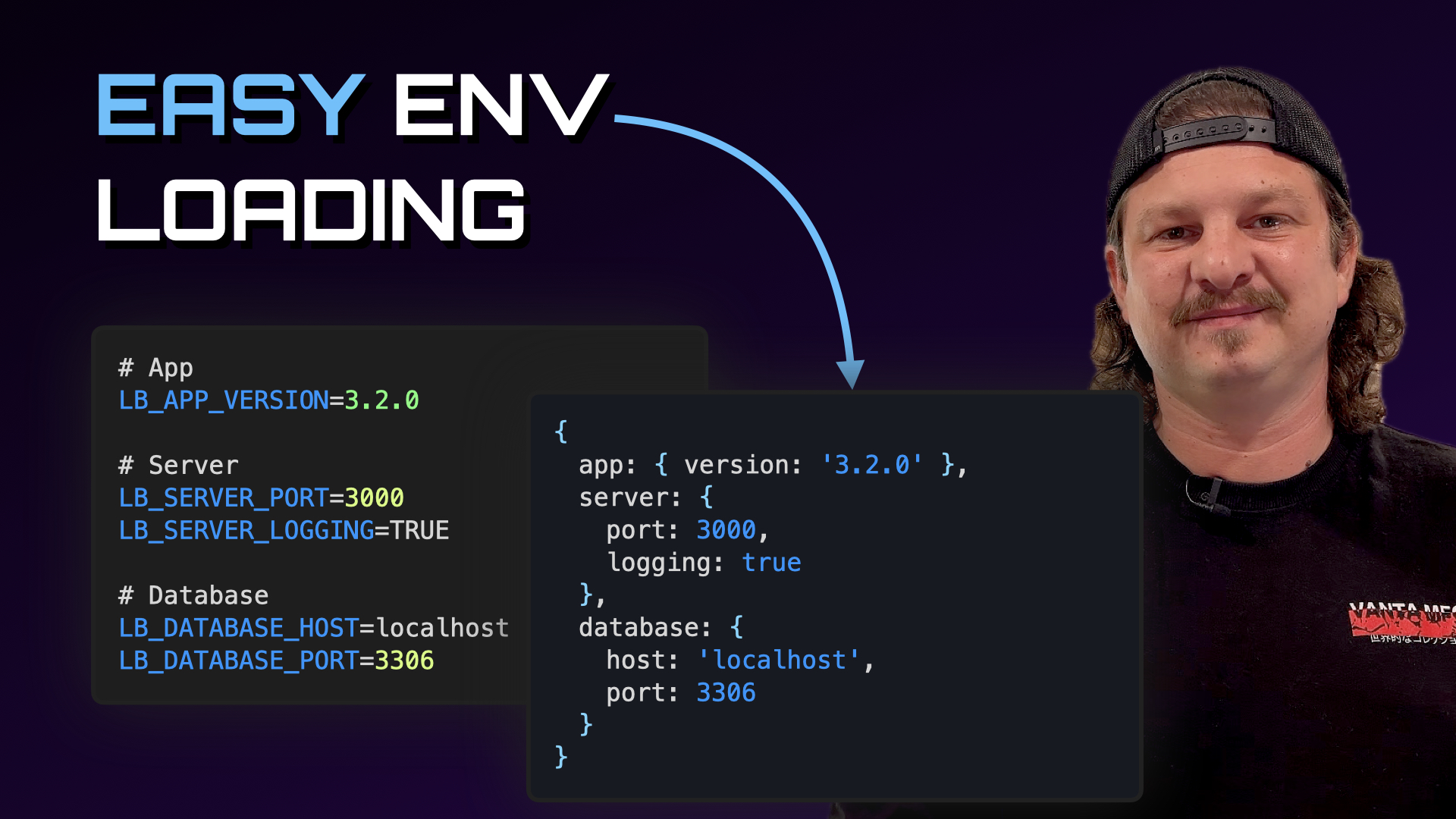
In software development, an .env file, also called a dotenv file or configuration file, is a plain text file that allows developers to keep configuration and secrets outside of the code.
This data is stored in the form of a list of key-value pairs, where each pair is represented by a variable name followed by the equal sign (=) followed by a variable value.
APP_VERSION=3.4.1
SERVER_PORT=3000
DATABASE_HOST=localhost
By extension, an env loader is a module responsible for making the variables present in an .env file accessible to a process by loading and injecting them into its environment at startup.
In this tutorial, you'll learn how to write a dependency-free env loader ECMAScript module in Node.js that automatically adapts to the runtime environment of the process and performs simple type coercion of environment variable values.
Load an .env file into the environment
Let's start by creating a new file named loadenv.js.
$ touch loadenv.js
Within this file, let's export a function named loadenv() that executes the process.loadEnvFile() function, which by default loads the content of the .env file located in the script's directory into the process environment.
import { loadEnvFile } from 'node:process';

export default function loadenv() {
  loadEnvFile();
}
Match the runtime environment
In practice, apps often runs in multiple environments, for example, development on your machine, test in CI, and production on a server.
Consequently, it is quite common to find one configuration file per environment, for example, .env.development, .env.test, .env.production.
To create a flexible env loader module that automatically matches the runtime environment of the process, let's modify the loadenv() function so that it either loads the matching .env.<environment> file if the NODE_ENV environment variable is set, or the default .env file otherwise.
For example:
NODE_ENV=production->.env.productionNODE_ENV=orundefined->.env
import { loadEnvFile } from 'node:process';
import { resolve } from 'node:path';

export default function loadenv() {
  const nodeEnv = process.env.NODE_ENV?.trim();
  const filename = nodeEnv ? `.env.${nodeEnv}` : '.env';

  loadEnvFile(resolve(process.cwd(), filename));
}
Now, since not all apps require an .env file, let's make environment loading optional by wrapping the call to loadEnvFile() into a try...catch block, which will allow the module to ignore "file not found" errors, and the app to continue normally.
import { loadEnvFile } from 'node:process';
import { resolve } from 'node:path';

export default function loadenv() {
  const nodeEnv = process.env.NODE_ENV?.trim();
  const filename = nodeEnv ? `.env.${nodeEnv}` : '.env';

  try {
    loadEnvFile(resolve(process.cwd(), filename));
  } catch(error) {
    if (error?.code !== 'ENOENT') {
      throw error;
    }
  }
}
Return a config object
As configuration files grow over time, the process.env object tends to rapidly turn into an inconsistent global "bag of strings" that is accessed from all over the code base.
To make configuration more predictable, we'll regroup all environment variables that start with a prefix (e.g., LB_, PUBLIC_, NODE_APP_) into a single config object, and return this object to the calling code, which in turn can be easily injected into the lower layers of the app and mocked in tests without having to touch the global process.env object.
For example, this configuration file:
LB_SERVER_PORT=3000
LB_DATABASE_HOST=localhost
Will result into this object:
import loadenv from '../loadenv/loadenv.js';

console.log(loadenv());
// { SERVER_PORT: '3000', DATABASE_HOST: 'localhost' }
Within the loadenv() function, let's create and return a new config object.
import { loadEnvFile } from 'node:process';
import { resolve } from 'node:path';

export default function loadenv() {
  // ...

  let config = {};

  return config;
}
Let's update the signature of the loadenv() function with an object that contains a prefix property that defines a default value for the environment variables prefix, and let's ensure that the prefix string is followed by an underscore character (_).
import { loadEnvFile } from 'node:process';
import { resolve } from 'node:path';

export default function loadenv({ prefix = 'LB_' } = {}) {
  // ...

  let config = {};
  prefix = prefix.endsWith('_') ? prefix : `${prefix}_`;

  return config;
}
Let's now iterate on all the environment variables and skip the ones that don't start with the prefix string.
import { loadEnvFile } from 'node:process';
import { resolve } from 'node:path';

export default function loadenv({ prefix = 'LB_' } = {}) {
  // ...

  let config = {};
  prefix = prefix.endsWith('_') ? prefix : `${prefix}_`;

  for (let [name, value] of Object.entries(process.env)) {
    if (!name.startsWith(prefix)) {
      continue;
    }
  }

  return config;
}
Finally, for the remaining environment variables, let's strip the prefix string from their name and add their value to the config object.
import { loadEnvFile } from 'node:process';
import { resolve } from 'node:path';

export default function loadenv({ prefix = 'LB_' } = {}) {
  // ...

  let config = {};
  prefix = prefix.endsWith('_') ? prefix : `${prefix}_`;

  for (let [name, value] of Object.entries(process.env)) {
    if (!name.startsWith(prefix)) {
      continue;
    }

    name = name.slice(prefix.length);
    config[name] = value;
  }

  return config;
}
Coerce environment variable values
By default, environment variables are always loaded as strings, even when they represent numbers or booleans, which often leads to repetitive conversions scattered across the codebase.
To keep configuration consistent, we'll add an optional coercion step that converts common string values into their JavaScript equivalents, for example, numbers like "3000" into 3000, and booleans like "true" into true.
Let's declare a function named coerceValue() that takes a string as parameter and either returns its coerced value if it's a boolean or a number, or its original value otherwise.
import { loadEnvFile } from 'node:process';
import { resolve } from 'node:path';

function coerceValue(value) {
  const v = value.trim();

  if (/^(true|false)$/i.test(v)) {
    return v.toLowerCase() === 'true';
  } else if (/^-?(?:0|[1-9]\d*)(?:\.\d+)?$/.test(v)) {
    return Number(v);
  }
  return value;
}

// ...
Let's then update the signature of the loadenv() function to include a property named coerce and execute the coerceValue() on the environment variable values if it is set to true.
// ...

export default function loadenv({ prefix = 'LB_', coerce = true } = {}) {
  // ...

  for (let [name, value] of Object.entries(process.env)) {
    if (!name.startsWith(prefix)) {
      continue;
    }

    name = name.slice(prefix.length);
    config[name] = coerce ? coerceValue(value) : value;
  }

  return config;
}
Nest environment variable names
While environment variables are usually explicit, they don't naturally express structure as they all end up at the same level, without any form of hierarchy.
To make configuration easier to navigate, we'll add an optional nesting mode that turns underscore-separated names (e.g., LB_APP_NAME) into nested objects, allows us to regroup related settings together.
For example, this configuration file:
LB_APP_NAME=learnbackend
LB_APP_VERSION=3.1.0
LB_SERVER_PORT=3000
Will result into this object:
import loadenv from '../loadenv/loadenv.js';

console.log(loadenv());
// { app: { name: 'learnbackend', version: '3.1.0' }, server: { port: 3000 } }
Let's update the signature of the loadenv() function to include a property named nest set to true.
// ...

export default function loadenv({ prefix = 'LB_', coerce = true, nest = true } = {}) {
  // ...
}
Let's add an if...else statement that checks the value of the nest property, and within it, let's split the environment variable names into arrays of lowercase strings using the underscore character as separator.
// ...

export default function loadenv({ prefix = 'LB_', coerce = true, nest = true } = {}) {
  // ...

  for (let [name, value] of Object.entries(process.env)) {
    if (!name.startsWith(prefix)) {
      continue;
    }

    name = name.slice(prefix.length);

    if (nest) {
      const parts = name
        .split('_')
        .filter(Boolean)
        .map(k => k.toLowerCase());
    } else {
      config[name] = coerce ? coerceValue(value) : value;
    }
  }

  return config;
}
Finally, let's use each element of the environment variable name as key of a nested object, and assign the environment variable value to the last element.
// ...

export default function loadenv({ prefix = 'LB_', coerce = true, nest = true } = {}) {
  // ...

  for (let [name, value] of Object.entries(process.env)) {
    if (!name.startsWith(prefix)) {
      continue;
    }

    name = name.slice(prefix.length);

    if (nest) {
      const parts = name
        .split('_')
        .filter(Boolean)
        .map(k => k.toLowerCase());
      let ref = config;

      parts.forEach((part, index) => {
        if (index === parts.length - 1) {
          ref[part] = coerce ? coerceValue(value) : value;
        } else if (typeof ref[part] !== 'object') {
          ref[part] = {};
        }
        ref = ref[part];
      });
    } else {
      config[name] = coerce ? coerceValue(value) : value;
    }
  }

  return config;
}